All projects

Case study · 2026

Visual Project Manager

A web app for planning projects. You enter tasks with dates and dependencies, and the app draws the Gantt chart and works out which tasks, if they slip, move the delivery date.

Type
Web app
Role
On my own: backend, frontend and deployment
Stack
Angular, Spring Boot, Keycloak, PostgreSQL
Tests
62 backend, 126 frontend, 3 end to end

To try it: user harriet, password demo. The data resets every six hours.

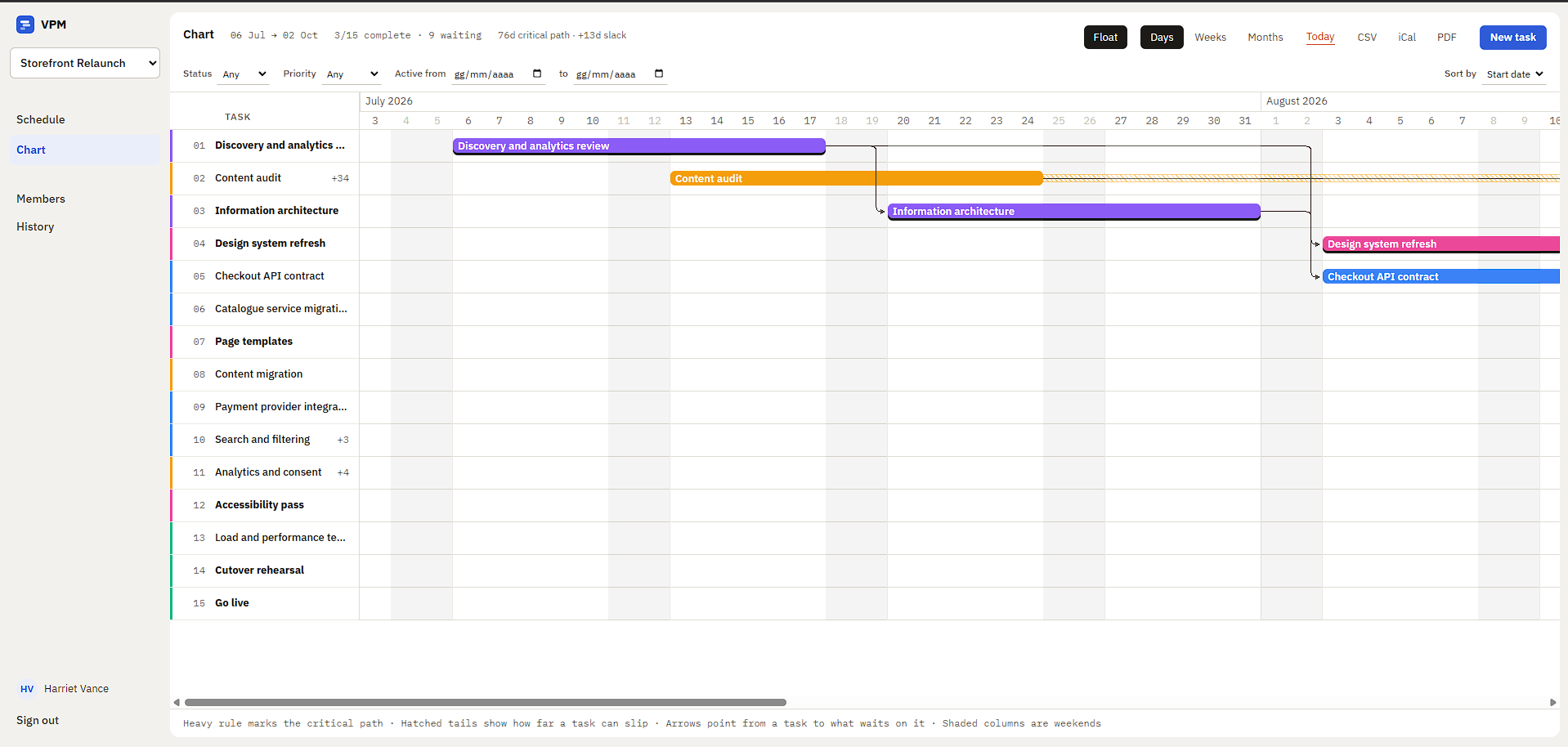
The Gantt chart of the sample project
The Gantt chart of the sample project, a website relaunch with 15 tasks.

What it is

It started as an assignment I gave my students when I was teaching: tasks with two dates, a board and a Gantt chart, with dependencies as the last step. Then I rebuilt it on my own with a fuller stack: Spring Boot instead of Flask and PostgreSQL instead of MySQL.

The part I added is the critical path. Knowing that a task is blocked is easy. Knowing which tasks actually push back the delivery means looking at all the dependencies together: in the sample project it's 7 tasks out of 15.

What you can do

  • Plan tasks with dates, status, priority and an owner
  • Link tasks with dependencies, without loops
  • See the Gantt chart by day, week or month
  • Invite people as owner, editor or viewer
  • See who changed what and when
  • Export to CSV or iCal, and print to PDF

How it works

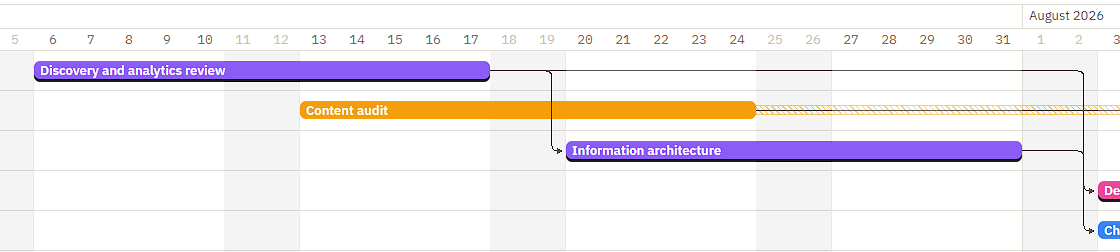
Detail of the Gantt chart with dependency arrows and a striped tail

The chart shows which tasks are critical

Bars with a dark bottom edge are critical: if one slips by a day, so does the delivery. The striped tail after a bar shows how far that task can slip from where it's drawn before it moves anything else. Arrows go from a task to the one waiting for it.
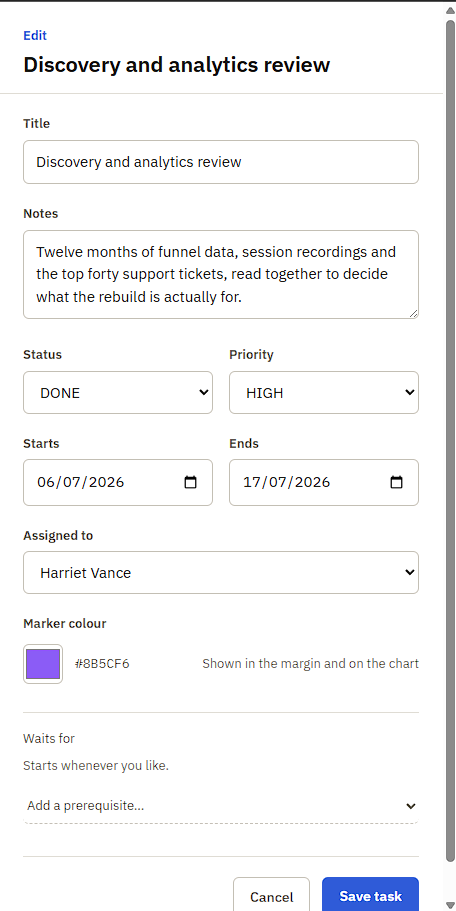
The panel for editing a task

Dependencies are checked as you add them

In a task's panel you choose which tasks it waits for. The app doesn't allow a dependency that goes in a circle, won't let you close a task while the ones it waits for are unfinished, and tells you which task is in the way. Two people adding dependencies at the same moment can't create a loop either: additions to the same project are handled one at a time.

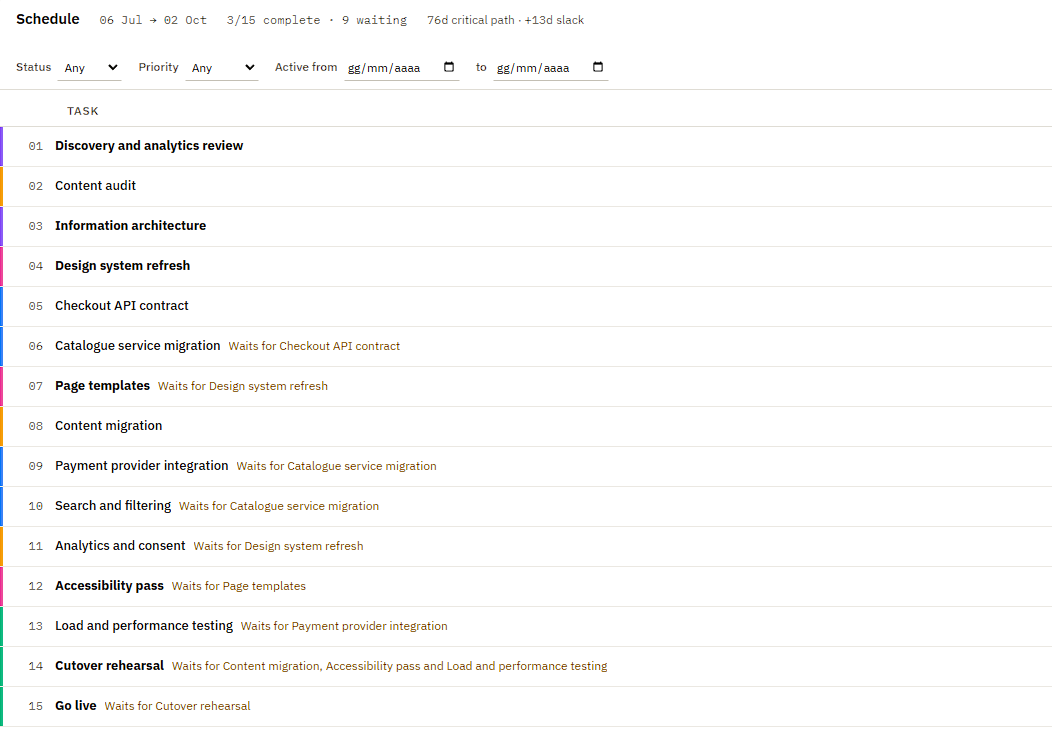
The task list with filters

The same plan, as a table

You can filter by status, priority and dates, and sort by date or title. The table and the chart read the same data, so they can't show different things. Bars in the chart can be dragged to change dates, and they snap back if the server refuses the change.

Technical choices

The critical path is computed on the whole graph

What I did

Two passes over the dependencies: forward for the earliest each task can start, backward for the latest that still doesn't move the delivery. Tasks with no gap between the two are critical. The model is deliberate: dependencies are finish-to-start, days are calendar days, and the forward pass ignores the planned start dates and schedules everything as early as possible, so "critical" means critical in an ideal replan, not in the plan as drawn. That leaves two different margins: the textbook total float, measured from a task's earliest possible start, and the striped tail on the chart, measured from where the bar actually sits. The tooltip shows both when they disagree.

What I ruled out

Highlighting the chain that looks like the backbone by eye. In the sample project the chain that reads as central carries 9 days of float, and a different chain sets the delivery date. The critical path is still the longest run by duration; it just isn't always the one that looks longest on the chart.

People outside a project get a 404, not a 403

What I did

A 403 would confirm that the project exists, and with ids in sequence, trying numbers would be enough to find other people's projects. The check is in the service layer, so it applies to every endpoint.

What I ruled out

Putting the check in the controller: an endpoint added later could forget it.

Two people editing the same task

What I did

Every task has a version number. The form sends it back when you save, and if someone else changed the task in the meantime, the save is refused instead of overwriting their change. The version is required, and the database checks it too, so no save can skip it.

What I ruled out

Comparing the last modified date. It was the first version, and a test showed that after two saves in a row the same person was blocked as if they were someone else.

What it doesn't do

  • No real-time editing: other people's changes show up within 20 seconds.
  • It doesn't check workload: one person can have three overlapping tasks.
  • It doesn't compare the plan with how it looked in the past.
  • It exports to CSV and iCal, and PDFs come from the browser's print dialog. There's no Microsoft Project format.